Create cinematic fashion clips from text and images on Android
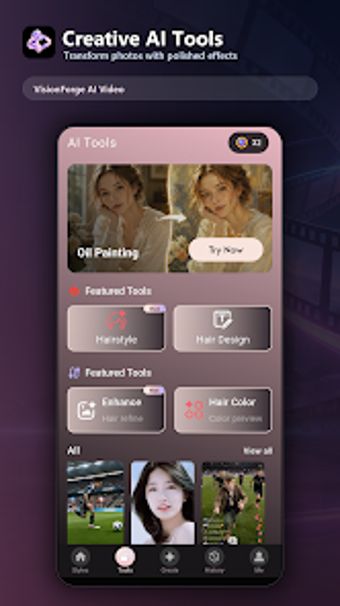
Generate cinematic video clips from short text prompts or source images using VisionForge AI Video, built for mobile prompt-to-video workflows. Jakayla Zenobia Benjamin developed the app for the fashion and beauty category, pairing a focused mobile interface with creative editing tools. Key functions include prompt-driven generation, style customization, and gallery management, aimed at social media creators, digital artists, and influencers who need quick, on-device prototypes and shareable visual concepts.
The app turns short descriptions into ready-to-review video concepts
VisionForge AI Video converts text prompts or existing images into cinematic clips using a prompt-to-video flow, so creators can move from idea to sample without desktop software. The generation step targets fashion and beauty visuals, producing polished clips that users can store in the app’s gallery for later review. This workflow focuses on rapid prototyping for social posts and visual storytelling on the go.
Integration fits Android-centered mobile workflows
The app is available on the Google Play Store and optimizes its controls for handheld use, which reduces setup friction for creators working from a phone. Gallery management is built into the interface so users can organize prior generation jobs without exporting immediately. The developer publishes the app as an Android release, so its core compatibility centers on mobile devices rather than desktop platforms.
Editing tools let you refine aesthetic and motion in-app
The app includes creative editing features that let users adjust motion, styles, and visual effects after generation, supporting iterative refinement inside the same session. Style customization controls let creators shift the visual aesthetic of a clip, and motion options alter how generated elements move, which helps shape finished concepts before sharing or reposting.
Privacy approach and early market footprint are focused and narrow
The developer emphasizes a privacy-first route, processing only content the user selects for generation, which limits external handling of unrelated personal data. As a newer release, the app holds a niche presence with early success in specific regional beauty-category rankings on the Play Store, indicating focused, initial traction rather than broad adoption.
To sum up, a compact prototyping tool for creators testing visual ideas
To sum up, VisionForge AI Video is a mobile-ready tool for creators who want fast, on-device video prototypes from text or images; it suits social media-focused artists and influencers who value quick iterations. Expect a privacy-minded, Android-only workflow and a small but targeted market presence. For best results, use the app’s mobile workflow to build and organize short concept clips during a single creative session.